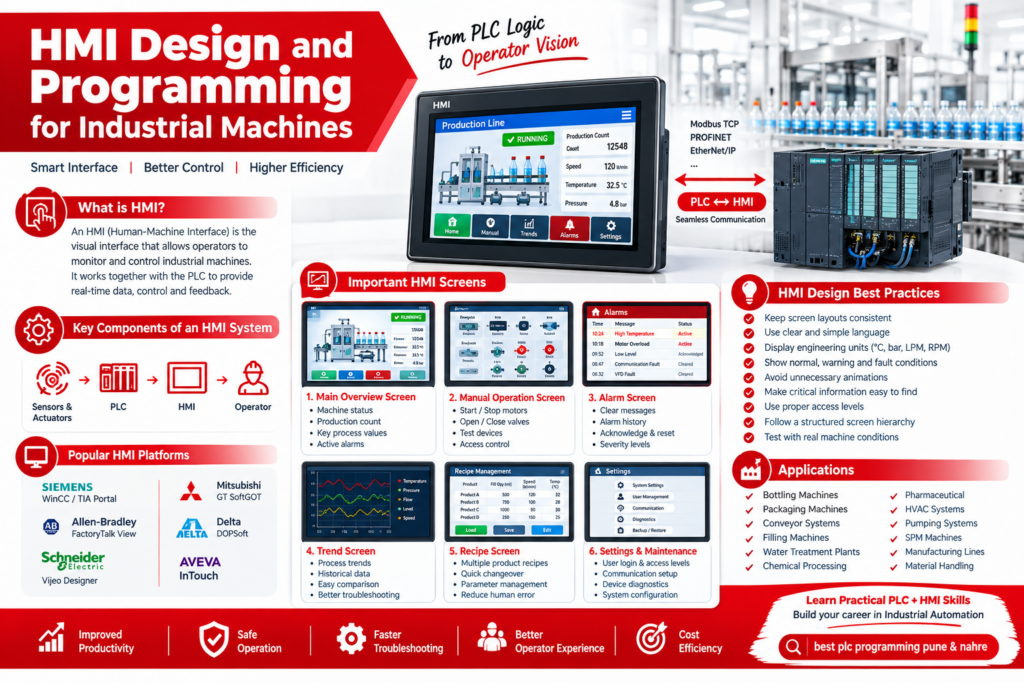
In modern industrial automation, an HMI (Human-Machine Interface) is one of the most important tools for machine operators. It provides a clear visual interface through which operators can monitor machine conditions, start or stop operations, adjust setpoints, view alarms, and understand production status.
A well-designed HMI works together with the PLC, sensors, drives, valves, motors, and other field devices. The PLC performs the actual control logic, while the HMI provides the operator with visualization and interaction.
What is HMI Design?
HMI design is the process of creating operator screens that make an industrial machine easy and safe to operate.
A typical HMI may include:
- Machine overview screen
- Manual and automatic modes
- Start/Stop controls
- Motor and pump status
- Temperature, pressure, level and flow values
- Production counters
- Alarm and fault screens
- Recipe management
- Trend displays
- Maintenance information
- User login and access levels
The objective is not simply to make the screen attractive. The operator should be able to understand the machine condition quickly and take the correct action.
HMI Programming and PLC Integration
HMI programming involves creating screens, configuring tags, connecting those tags with PLC variables, setting alarms, creating trends and configuring operator controls. Communication between PLC and HMI can use industrial protocols such as PROFINET, EtherNet/IP, Modbus TCP, Modbus RTU or OPC UA, depending on the selected hardware and architecture.
A basic architecture is:
Sensors & Actuators → PLC → HMI → Operator
For example, in a packaging machine, the PLC may control conveyors, motors, sensors and pneumatic valves. The HMI can display conveyor status, production count, machine speed, faults and operating modes.
Important HMI Screens for Industrial Machines
1. Main Overview Screen
The main screen should provide an immediate overview of the machine.
It can show:
- Machine running/stopped status
- Production status
- Auto/Manual mode
- Motor status
- Important process values
- Active alarms
- Production counters
2. Manual Operation Screen
A manual screen allows authorized operators or maintenance engineers to test individual devices.
For example:
Motor → Start / Stop
Valve → Open / Close
Pump → Start / Stop
Cylinder → Extend / Retract
Manual controls should be properly protected with permissions and interlocks.
3. Alarm Screen
Alarms help operators identify abnormal conditions quickly.
Examples include:
- Motor overload
- Emergency stop active
- Low material level
- High temperature
- Sensor failure
- Communication fault
- VFD fault
- Pneumatic pressure low
Good alarm design should provide meaningful messages instead of simply displaying an error code. Alarm configuration is an important part of professional HMI development.
4. Trend Screen
Trends are useful for monitoring process variables over time.
For example:
- Temperature trend
- Pressure trend
- Flow trend
- Level trend
- Motor speed
- Production rate
This helps operators and engineers identify process changes and troubleshoot problems.
5. Recipe Screen
Recipe management is especially useful for machines producing multiple products.
A recipe can contain:
- Product name
- Filling quantity
- Machine speed
- Temperature setpoint
- Pressure setpoint
- Timer values
- Production parameters
This allows operators to select predefined production parameters instead of entering every value manually.
HMI Design Best Practices
A professional HMI should focus on clarity, consistency and usability.
Some important practices include:
- Keep screen layouts consistent.
- Use clear names for buttons and parameters.
- Display engineering units such as °C, bar, LPM and RPM.
- Clearly distinguish normal, warning and fault conditions.
- Avoid unnecessary animations.
- Keep critical information easy to find.
- Use appropriate access levels for operators, maintenance staff and engineers.
- Test every screen with realistic machine conditions.
Modern HMI guidance also emphasizes structured screen hierarchy, proper tag organization, alarm management and operator-focused design.
HMI Projects for Industrial Machines
HMI programming can be applied to many industrial applications, including:
- Bottling machines
- Packaging machines
- Conveyor systems
- Filling machines
- Water treatment plants
- Chemical processing machines
- Pharmaceutical machinery
- HVAC systems
- Pumping systems
- SPM machines
- Manufacturing lines
- Material handling systems
- Utility systems
For example, a bottling machine HMI can display bottle count, conveyor speed, filling status, capping status, motor conditions, production targets and machine alarms on a single operator interface.
PLC, HMI and SCADA Skills
For an automation engineer, understanding the relationship between PLC programming, HMI programming and SCADA is extremely valuable.
The PLC handles real-time machine control. The HMI provides local machine-level visualization and operator interaction, while SCADA can provide higher-level monitoring, historical data, reporting and centralized supervision.
Therefore, students and engineers learning industrial automation should ideally develop practical skills in:
PLC Programming → HMI Design → PLC-HMI Communication → SCADA → Industrial Networking → Troubleshooting
Why Learn HMI Design and Programming?
HMI skills are useful for both industrial automation engineers and PLC programmers because most real-world machine automation projects require an operator interface.
Learning HMI programming can help you understand:
- PLC tag management
- Industrial communication
- Machine operation
- Alarm handling
- Process visualization
- Troubleshooting
- Operator controls
- Recipe management
- Industrial machine commissioning
For students and freshers, combining PLC + HMI + SCADA + practical projects provides a stronger foundation for entering the industrial automation field.
Learn Practical PLC and HMI Programming
If you are looking for practical industrial automation skills, focus on building complete projects rather than learning HMI screens separately. A good training path should include PLC logic, HMI screen development, tag mapping, communication, alarms, trends and machine troubleshooting.
The keyword best plc programming pune & nahre is also relevant for students and engineers searching for practical PLC and HMI programming training in the Pune region.
Conclusion
HMI Design and Programming for Industrial Machines is an essential skill in modern industrial automation. A properly designed HMI makes machine operation easier, improves visibility, supports troubleshooting and provides operators with the information they need at the right time.
When combined with PLC programming, SCADA, industrial communication and hands-on machine projects, HMI skills can help students and automation professionals build practical knowledge for real industrial applications.
HMI Design, HMI Programming, Industrial HMI, PLC HMI Programming, HMI Training, PLC Programming, Industrial Automation, Machine Automation, HMI SCADA, PLC HMI Integration, best plc programming pune & nahre.